Gift limit
The Gift Limit feature allows merchants to control how many gifts a customer can claim when multiple gifts are available in a campaign.
This ensures that customers cannot select all gifts at once, but instead only a defined number of gifts from the list.
Additionally, merchants can enable Multiply Gift Limit to reward customers with additional gifts as they spend more, encouraging larger purchase amounts.
Applicable Campaign Types
Gift Limit is available for:
- Gift with cart value
- BXGY (Buy X Get Y)
- Gift with quantity purchase
- Gift with specific collection
Setup
- Create or edit a campaign that supports Gift Limit.
- Go to Optional rules.
- Enable Gift limit. (this feature is available for paid plan)
- Set the maximum number of gifts a customer can choose.
- (Optional) Enable Multiply gift limit if you want to increase gift limits based on higher cart values/higher item quantity
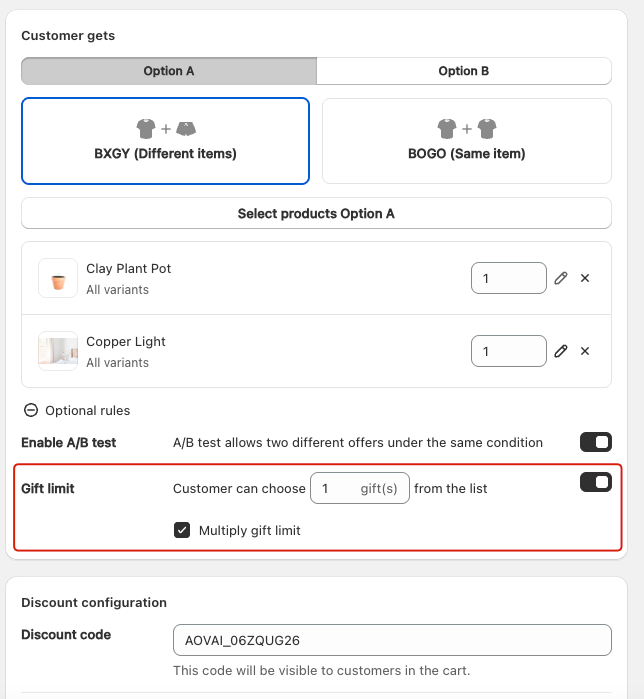
Multiply gift limit
The Multiply Gift Limit feature allows merchants to reward customers with additional gifts as they spend more or buy more
This encourages larger purchase amounts by scaling the number of gifts based on the customer’s cart value /item quantity.
When Multiply Gift Limit is enabled, the app automatically increases the number of gifts a customer can select according to their spend level.
Formula:
Total Gift Limit = Base Gift Limit × Cart Threshold Reached
Example
- Campaign Rule: $100 spend = 1 gift limit.
| Cart Value | Gift Limit |
|---|---|
| $100 | 1 gift |
| $200 | 2 gifts |
| $300 | 3 gifts |
- A customer spends $250 → qualifies for 2 gifts.
- A customer spends $320 → qualifies for 3 gifts.
- The number of gifts they can select increases automatically as their cart value/ item quanity grows.
- Example: At $100, the customer can only choose 1 gift. At $300, the customer can choose 3 gifts from the list.