Free plan limits
The Forever Free tier of AOV.ai Discount Free Gift BOGO has two hard limits: a monthly revenue allowance generated by the app, and a cap on active campaigns. This page explains both, what happens when you hit them, and how to monitor your usage inside the app.
Who this applies to
Anyone on the Forever Free plan. The limits do not apply to paid tiers (Basic, Grow, Advanced, Plus).
The two limits
| Limit | Value |
|---|---|
| Monthly revenue allowance (installed on or after Oct 27, 2025) | $500 per month |
| Monthly revenue allowance (installed before Oct 27, 2025) | $1,000 per month (legacy) |
| Active campaigns | 2 maximum at any time |
"Revenue by app" is the order revenue your store earned from carts that contained a campaign created in this app. See What counts as Revenue by App for the precise definition.
What happens when you reach the limit
- All active campaigns automatically move to Expired status.
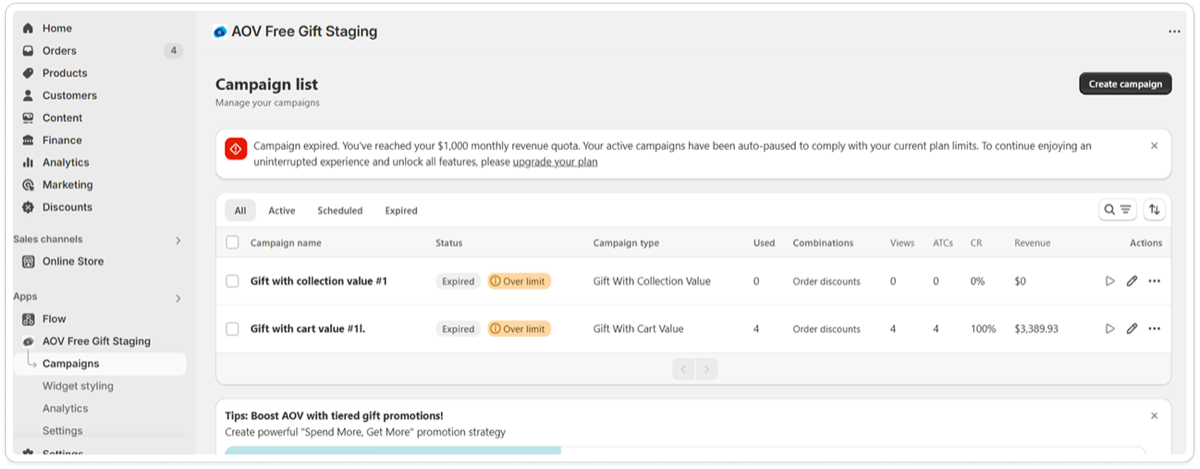
- An Over limit badge appears next to affected campaigns on the Campaign List.
- The app sends an email notification to remind you.
The block is account-wide, not per campaign. Deleting and recreating a campaign will not work, the new campaign starts in Expired status until the cycle resets or you upgrade.
What happens at the next reset
The reset follows a 30-day cycle based on your install date. At the start of the next cycle:
- Your usage counter resets to 0.
- Your campaigns stay in Expired status until you manually reactivate them.
- The Over limit banners disappear.
What happens when you upgrade to a paid plan
- The Over limit badge clears from any expired campaigns.
- The limit banner disappears.
- You see a reminder to re-enable any campaigns that were expired due to the limit (they do not auto-enable, so you do not accidentally re-run stale promotions).
Monitoring your usage
You can see real-time usage in two places inside the app.
Dashboard and Pricing tab
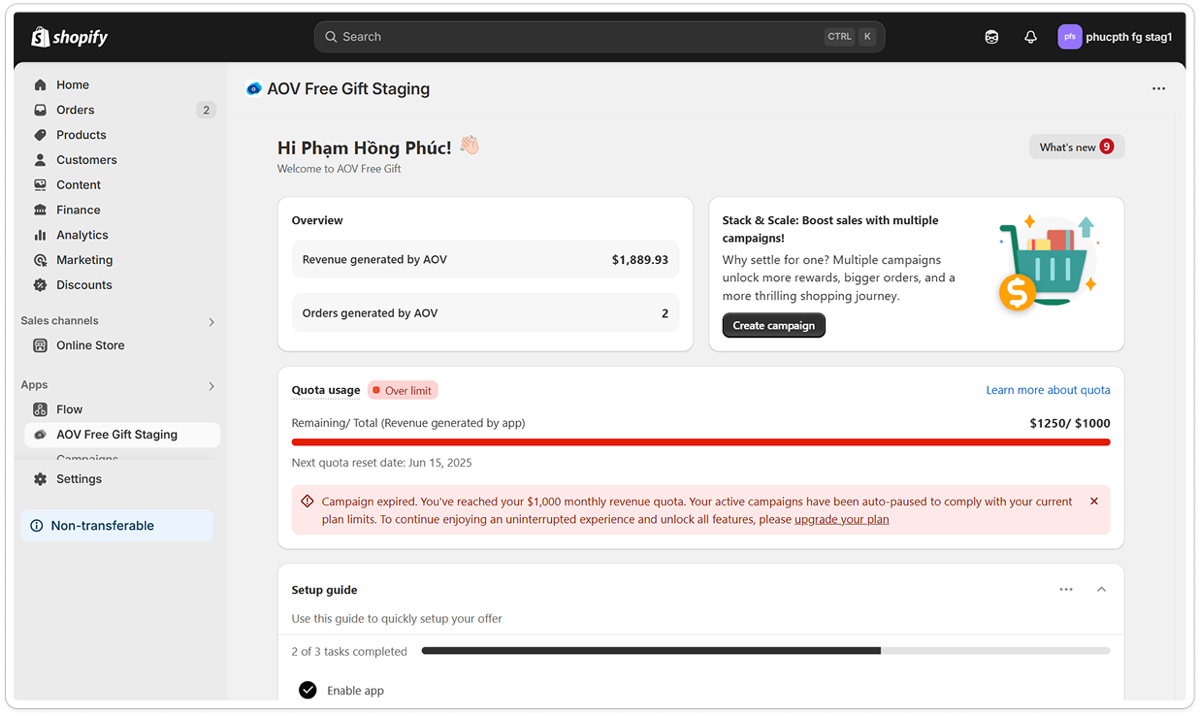
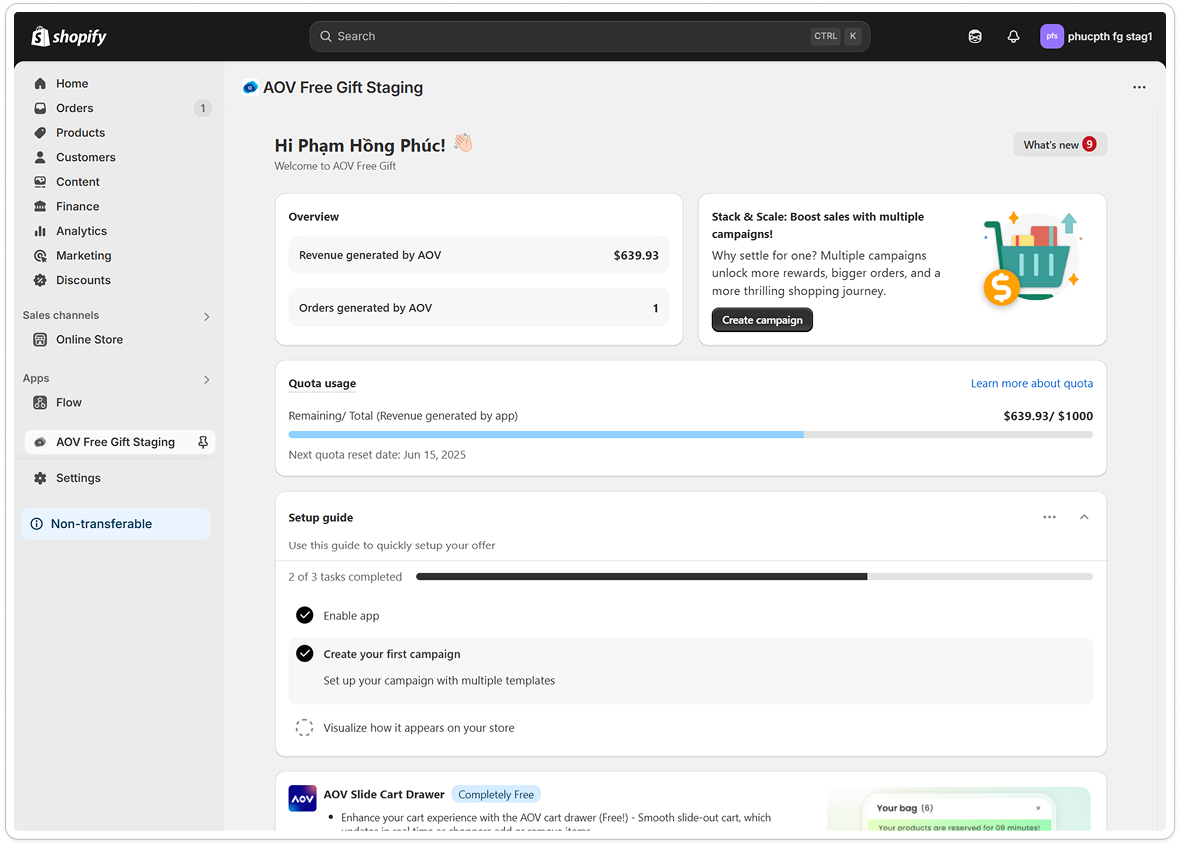
The quota card shows:
- Current revenue used out of your allowance (for example, $213 / $500)
- A progress bar with color coding:
- Blue: under 80% of the limit
- Yellow: 80 to 95%
- Red: 95% or above
- The next reset date for your 30-day cycle
- A tooltip explaining the limits for your install date
Campaign List
Affected campaigns show an Over limit badge directly on the list, so you can spot them at a glance.
Tips for managing your quota
- Track usage on the Dashboard progress bar.
- Upgrade early if you expect a high-traffic month or a viral campaign.
- If you only need to keep two campaigns active, the Forever Free tier can run forever.
Frequently asked questions
Can I still access my campaigns after hitting the limit?
Yes, but you cannot enable or run them until:
- The new cycle starts (when your quota resets), or
- You upgrade to a paid plan.
If I delete and recreate a campaign, will it work again?
No. The revenue limit is applied account-wide, not per campaign. Even newly created campaigns will be marked Expired if you have already hit the limit.
When does the quota reset?
The quota resets automatically at the start of your next 30-day cycle, based on your install date. The Dashboard progress bar shows your reset date.
Where can I track how much revenue I have used?
In the Dashboard and the Pricing tab. Both show your current revenue used and the color-coded progress bar described above.
What if I upgrade to a paid plan after hitting the limit?
After upgrading, the Over limit badge is removed and you can manage campaigns again. You still need to manually re-enable any campaigns that were expired due to the limit.
What happens if I downgrade back to Forever Free?
The original reset date from your install date still applies. The free limit reapplies, and any campaigns beyond the quota return to Over limit status.
How do I remove the limit and keep my campaigns active?
Click Upgrade to Unlock from any warning banner or open the Pricing tab. Paid plans have no campaign count limit and a much higher (or no) revenue allowance, depending on the tier.
Related guides
- All plans: pricing directory for every tier, including paid options that lift the Free plan limits
- What counts as Revenue by App: definition of the revenue your quota tracks
If you need help choosing a paid plan, contact our support team.